
In this post, we will talk about best practices on how to troubleshoot some of the most common issues. We will cover power, control box modes, cable connections, and issues with sound, lights, and movement.
Power Adapter & Power Source
There are 2 types of adapters: indoor and outdoor. An outdoor adapter will have a threaded moisture cap providing extra protection against moisture. We recommend keeping it screwed on tightly at all times.
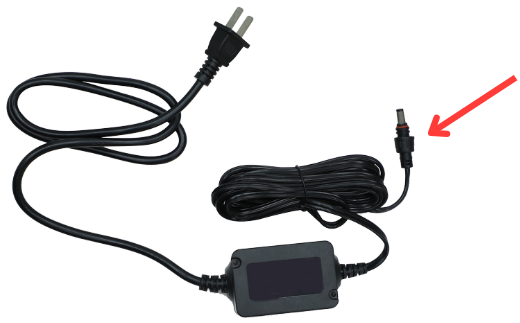
If your item is not turning on, start with these steps:
- Make sure the adapter is firmly connected to the Function Control Box. For outdoor props, double-check that the moisture cap is screwed on tightly to keep the connection dry and secure.
- Plug the adapter into a working outlet. If your prop doesn't power on, try a different outlet.
- If possible, test with another adapter. While most SVI adapters are interchangeable, it's best to use one with matching specs.
- If your item has a receiver box, try skipping the receiver box and connecting the adapter directly into the control box.
Control Box Mode & Indicator Light
Most SVI animatronics will have at least two of the following modes:
- Off/Try Me (Step Pad)
- Sensor/Timer
- Lights Only
- On
Some props have a mode button that you can press to cycle through settings. Others may use a physical switch. Some props will have a red indicator light on the control box. If the red light is on, great! It means that there's power; just switch the mode to the preferred setting.
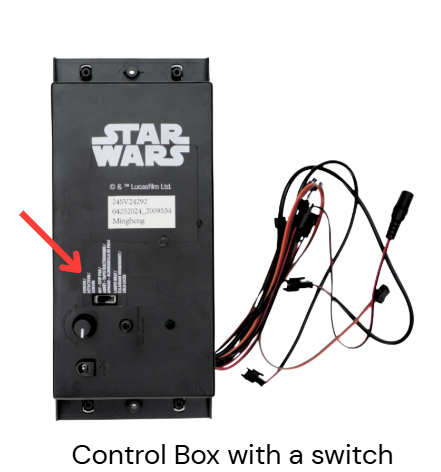
Not sure if your prop has a red light indicator?
Refer to the product’s Help Center article under “Important Setup Tips” to find out.
If the red light indicator doesn’t come on when cycling through the modes, and you believe your prop should have one, it could point to a power issue. In that case, go back and double-check the steps under Power Adapter & Power Source.
Check Cable Connections
SVI animatronics have cables connecting different components like the head, torso, base, lights, and control box.
Important: Always unplug the item from the outlet before handling any wires.
Then:
- Unplug and replug each connector one at a time to ensure everything is fully seated.
- Most cables are color-coded, so match each plug to its corresponding port.
- We recommend following the Instruction Sheet for step-by-step assembly. You can find it in the product’s Help Center article under “Download Parts List and Assembly Instructions.”
-
For props that only operate in Sensor Mode, make sure:
The sensor is securely connected to the control box.
The sensor is not obstructed.
Sound, Light, and Animation
No sound?
Adjust the volume dial on the control box. It might be turned all the way down.
Lights not turning on?
Try switching between Sensor, On, or Lights Only modes.
If lights still don’t activate, double-check that the cables are fully connected.
No movement?
Confirm all motion cables are connected properly.
Make sure there’s nothing caught or blocking the moving parts.
Still have questions? Drop a comment below and we’ll be happy to help!
I purchased the Bobby Strings animatronic from Spirit Halloween last year. We only used it for a few hours while handing out candy since he's delicate. We put him away in the box and this year he doesn't work. When I touch the control board I get a little static and his jaw moves once when initially plugged in. Any advice? I can't seem to find his control box on the svi website.
I purchased an 8 foot animatronic skeleton a few years ago. I love it, but this year as I was putting it together, the yellow sound cable broke at the plastic connector, so no sound. Is there any way to purchase a replacement cable or is there a way to fix it? Thank you.
Did you ever find the solution? I have the 2025 Evil Queen. The lights come on but there is NO movement anymore. I don't know if I need a new control box or a new motor. All connections are very secure.